Introduction to Replicated
This topic provides an introduction to the Replicated Platform, including a platform overview and a list of key features. It also describes the Commercial Software Distribution Lifecycle and how Replicated features support each phase of the lifecycle.
About the Replicated Platform
Replicated is a commercial software distribution platform. Independent software vendors (ISVs) can use features of the Replicated Platform to distribute modern commercial software into complex, customer-controlled environments, including on-prem and air gap.
The Replicated Platform features support independent software vendors (ISVs) during each phase of the Commercial Software Distribution Lifecycle. For more information, see Commercial Software Distribution Lifecycle on this page.
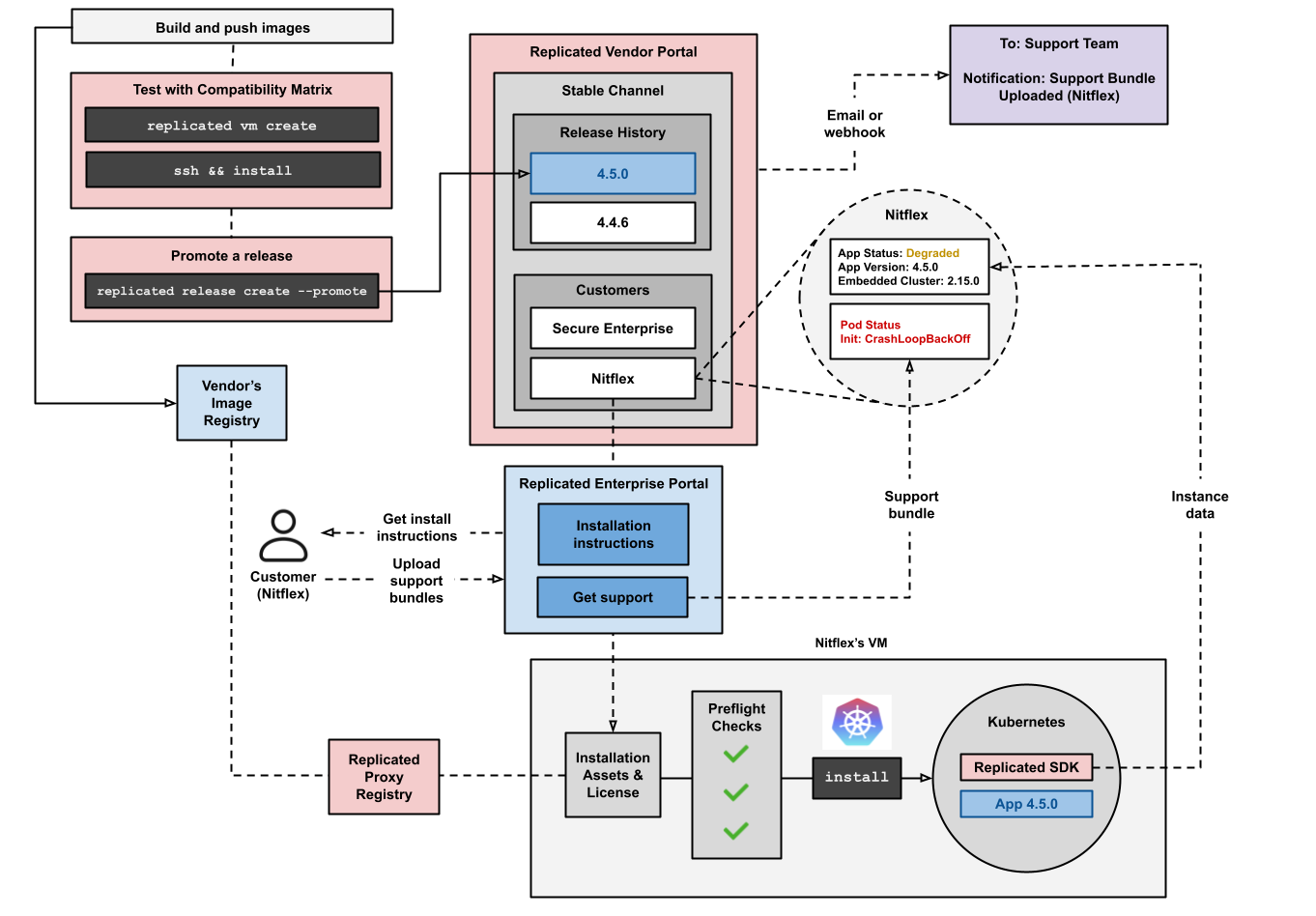
The following diagram shows how the Replicated Platform supports the full application lifecycle, from distribution and installation with Embedded Cluster to post-installation support:
View a larger version of this image
The diagram shows how software vendors use CI/CD pipelines to test releases in environments provisioned by Replicated Compatibility Matrix (CMX). Vendors then promote releases to a customer-facing or internal channel in the Vendor Portal.
Customers can install application releases that vendors promote to the channel to which they subscribe. To install, the customer logs in to the Replicated Enterprise Portal to download their license, which grants proxy access to the application images through the Replicated proxy registry. They also download the installation assets for the Replicated Embedded Cluster installer.
Customers can access the Enterprise Portal at any time to get installation and update instructions, upload support bundles, view security information from the Security Center, and more.
During installation, Embedded Cluster runs preflight checks on the host to verify that the environment meets the installation requirements. Then, it creates a Kubernetes cluster in the VM and installs Replicated KOTS in the cluster. KOTS provides an Admin Console where the customer enters application-specific configurations, runs application preflight checks, optionally joins nodes to the cluster, and then deploys the application. After installation, customers can manage both the application and the cluster from the Admin Console.
Embedded Cluster also deploys the Replicated SDK in the cluster, if the vendor included the SDK as a dependency of their application. The SDK's in-cluster API sends instance data and custom metrics from the customer environment to the Vendor Portal.
Vendors can configure event notifications to email or webhook destinations. These notifications alert vendors when a customer uploads a support bundle, when an instance is unhealthy for an extended period, or when a trial license is about to expire.
Replicated Platform features
The following describes the key features of the Replicated Platform.
Embedded Cluster
Replicated Embedded Cluster is a Kubernetes installer based on the open source Kubernetes distribution k0s. With Embedded Cluster, users install and manage both the cluster and the application together as a single appliance on a VM or bare metal server. This design embeds Kubernetes with the application.
Additionally, each version of Embedded Cluster includes a specific version of Replicated KOTS that Embedded Cluster installs in the cluster during installation. Embedded Cluster uses KOTS to deploy the application; KOTS also provides the Admin Console UI where users can manage both the application and the cluster.
For more information, see Embedded Cluster Overview.
KOTS (Admin Console)
KOTS is a kubectl plugin and in-cluster Admin Console that installs Kubernetes applications in customer-controlled environments.
Replicated Embedded Cluster uses KOTS to deploy applications and provide the Admin Console UI where users can manage both the application and the cluster. You can also use KOTS to install applications in existing Kubernetes clusters in customer-controlled environments, including air-gapped environments with limited or no outbound internet access.
For more information, see Introduction to KOTS.
Preflight checks and support bundles
Preflight checks and support bundles are provided by the Troubleshoot open source project, which is maintained by Replicated. Troubleshoot is a kubectl plugin that provides diagnostic tools for Kubernetes applications. For more information, see the open source Troubleshoot documentation.
Preflight checks and support bundles analyze data from customer environments to provide insights that help users to avoid or troubleshoot common issues with an application:
- Preflight checks run before an application is installed to check that the customer environment meets the application requirements.
- Support bundles collect troubleshooting data from customer environments to help users diagnose problems with application deployments.
For more information, see About Preflight Checks and Support Bundles.
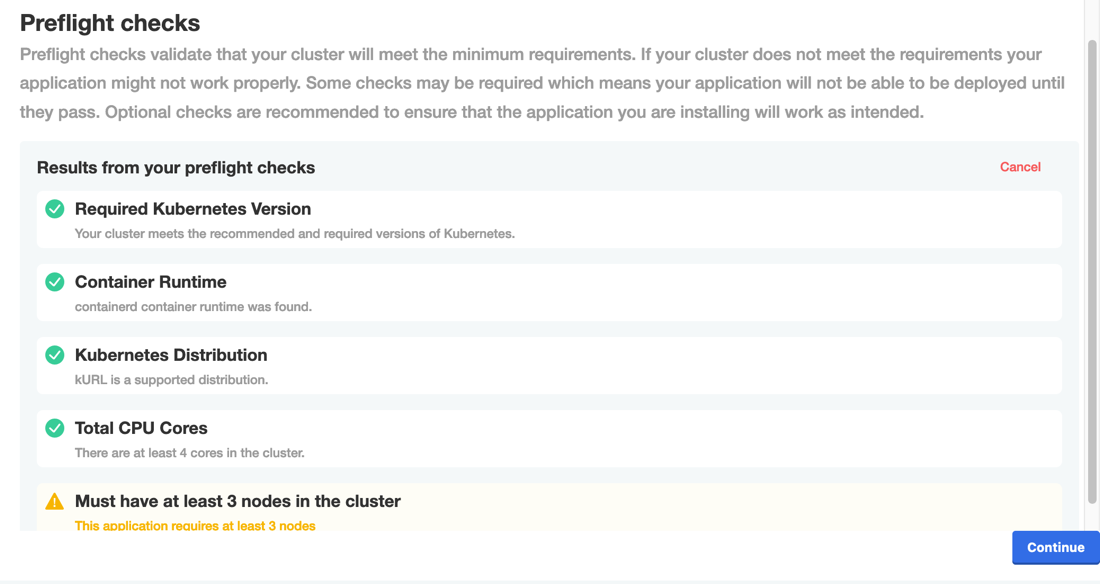
The following shows an example of the results of preflight checks displayed in the Admin Console during installation:
View a larger version of this image
Proxy registry
The Replicated proxy registry grants proxy access to an application's images using the customer's unique license. This means that customers can get access to application images during installation without the vendor needing to provide registry credentials.
For more information, see About the Replicated Proxy Registry.
Replicated SDK
The Replicated SDK is a Helm chart that you can install as a small service alongside your application. It provides an in-cluster API that communicates with the Vendor Portal. For example, the SDK API can return details about the customer's license or report telemetry on the application instance back to the Vendor Portal.
For more information, see About the Replicated SDK.
Vendor Portal
The Replicated Vendor Portal is the web-based interface for configuring Replicated features, managing application releases, viewing customer insights and reporting, and managing teams.
You can also interact with the Vendor Portal programmatically using the following developer tools:
-
Replicated CLI: Use the Replicated CLI to complete tasks programmatically, including all tasks for packaging and managing applications, and managing artifacts such as teams, license files, and so on. For more information, see Installing the Replicated CLI.
-
Vendor API v3: Use the Vendor API to complete tasks programmatically, including all tasks for packaging and managing applications, and managing artifacts such as teams and license files. For more information, see Using the Vendor API v3.
Enterprise Portal (beta)
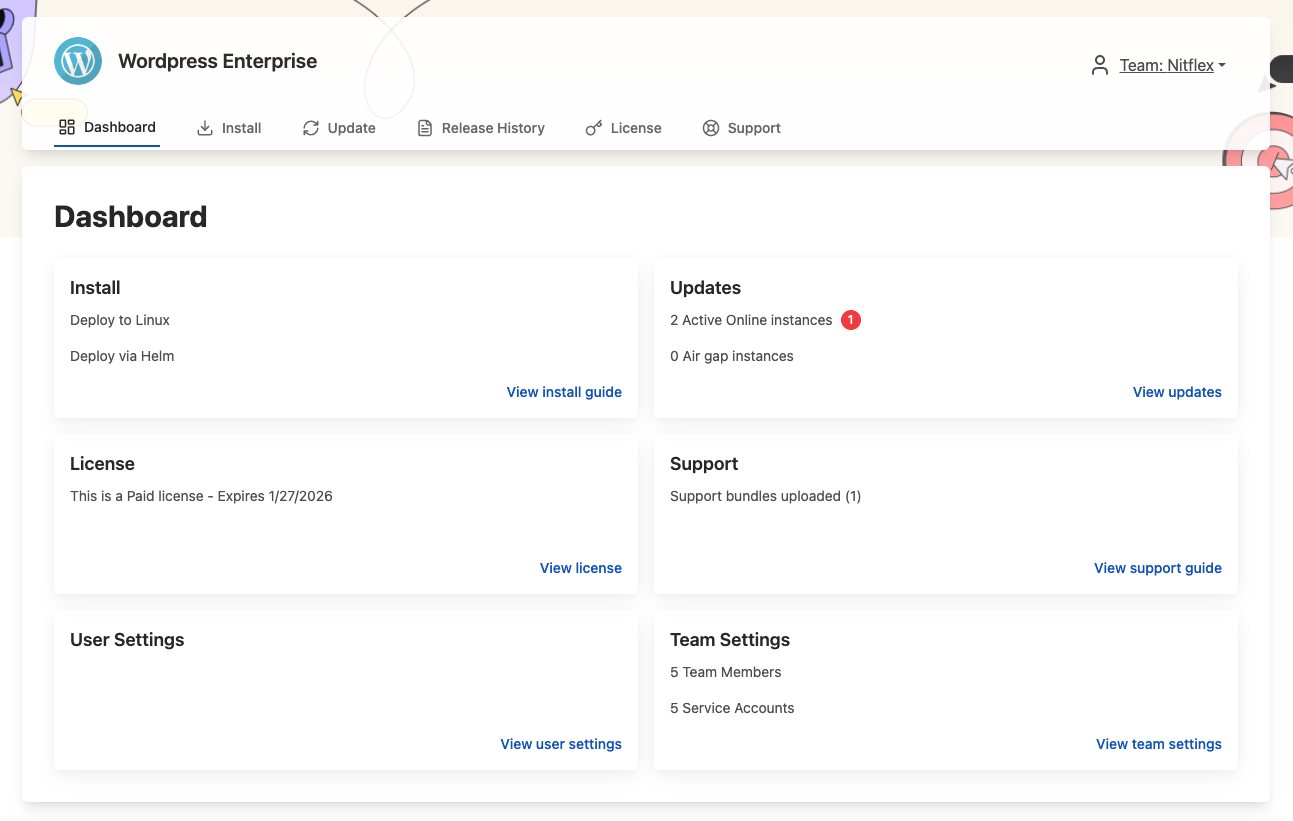
The Enterprise Portal is a customizable, web-based portal where customers can view install and update instructions, upload support bundles, view instance insights, and more. For more information, see About the Enteprise Portal.
The following shows an example of the Enterprise Portal dashboard:
View a larger version of this image
Compatibility matrix
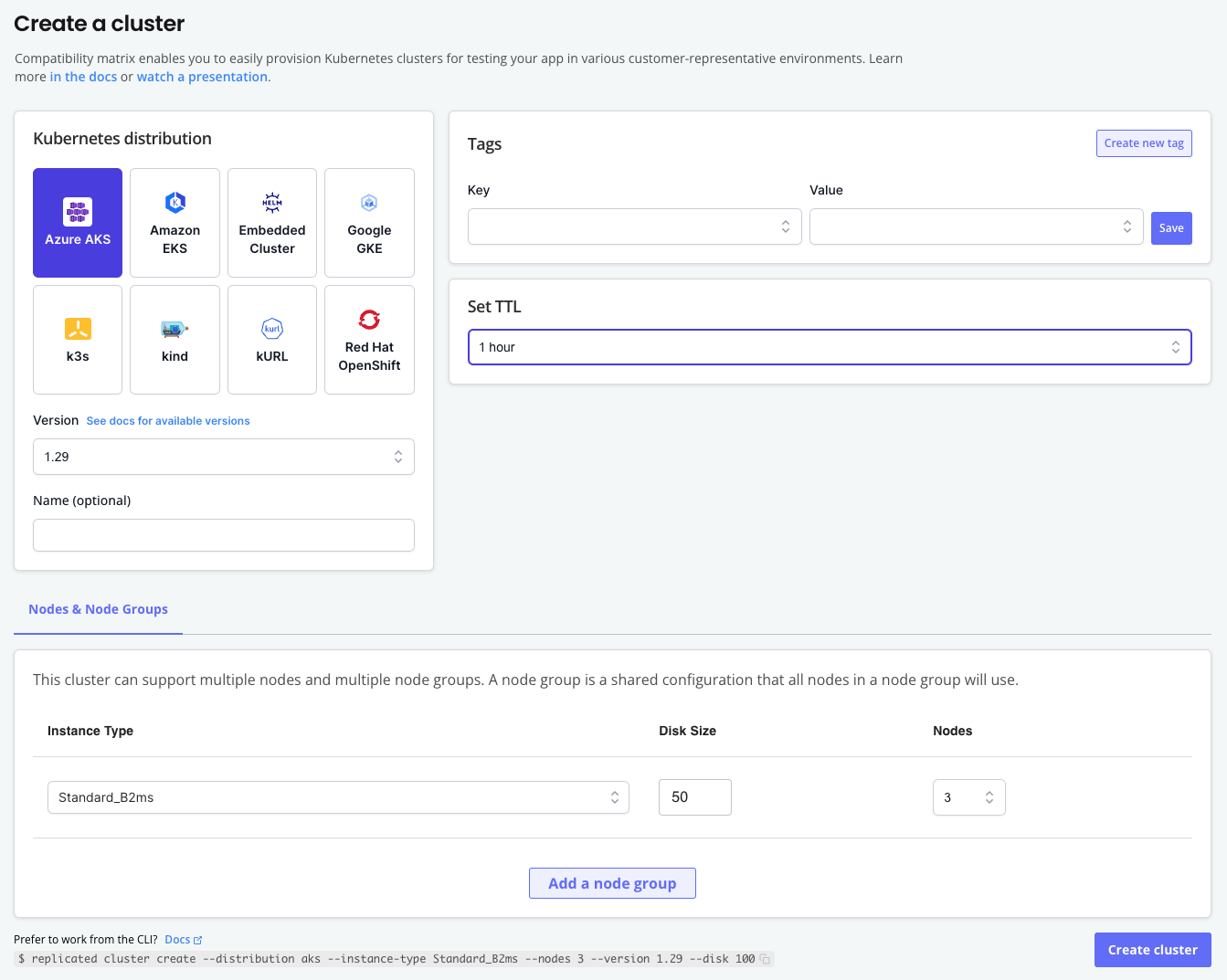
Use Replicated Compatibility Matrix (CMX) to create VMs or Kubernetes clusters within minutes. Interact with CMX through the Vendor Portal or the Replicated CLI to integrate CMX into your existing CI/CD workflows and programmatically create test environments.
For more information, see About CMX.
The following shows the CMX page for creating a cluster:
View a larger version of this image
Commercial software distribution lifecycle
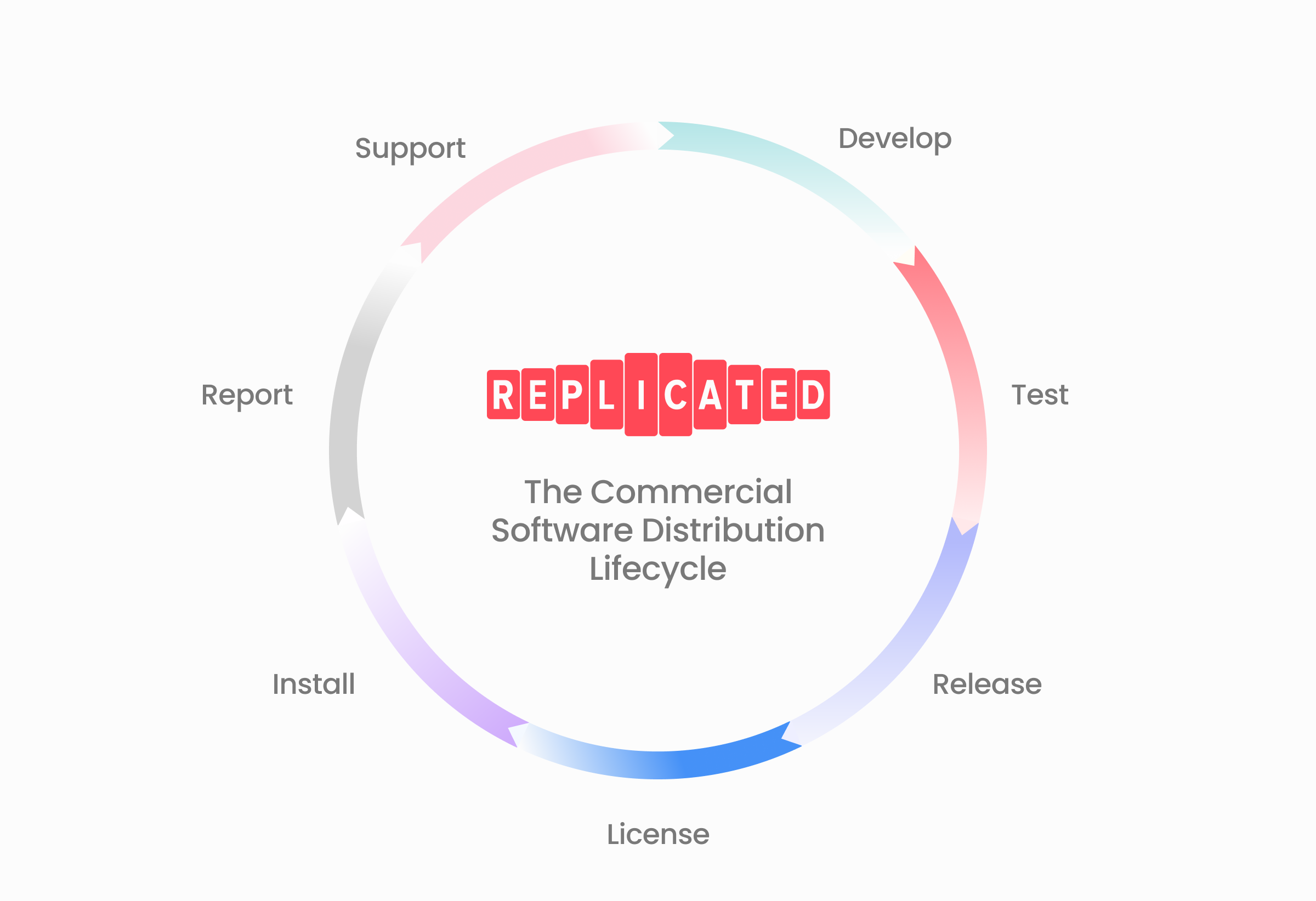
Replicated Platform features support ISVs in each phase of the Commercial Software Distribution Lifecycle, shown in the following diagram:
View a larger version of this image
Commercial software distribution is the business process that independent software vendors (ISVs) use to enable enterprise customers to self-host a fully private instance of the vendor's application in an environment controlled by the customer.
Replicated has developed the Commercial Software Distribution Lifecycle to represents the stages that are essential for every company that wants to deliver their software securely and reliably to customer controlled environments.
This lifecycle was inspired by the DevOps lifecycle and the Software Development Lifecycle (SDLC), but it focuses on the unique things that must be done to successfully distribute third party, commercial software to tens, hundreds, or thousands of enterprise customers.
For more information about to download a copy of The Commercial Software Distribution Handbook, see The Commercial Software Distribution Handbook.
The following describes the phases of the software distribution lifecycle:
- Develop: Application design and architecture decisions align with customer needs, and development teams can quickly iterate on new features.
- Test: Run automated tests in several customer-representative environments as part of continuous integration and continuous delivery (CI/CD) workflows.
- License: Customize licenses for each customer and issue, manage, and update them as needed.
- Release: Use channels to share releases with external and internal users, publish release artifacts securely, and use consistent versioning.
- Install: Provide unique installation options depending on customers' preferences and experience levels.
- Report: Make more informed prioritization decisions by collecting usage and performance metadata for application instances running in customer environments.
- Support: Diagnose and resolve support issues quickly.
For more information about the Replicated features that support each phase, see the following sections.
Develop
The Replicated SDK exposes an in-cluster API that you can develop against to quickly integrate and test core functionality with an application. For example, after installing the SDK in a customer environment alongside your application, use the in-cluster API to send custom metrics to the Replicated vendor platform.
For more information about using the Replicated SDK, see About the Replicated SDK.
Test
Use CMX to quickly provision ephemeral VMs and Kubernetes clusters. When integrated into CI/CD workflows, CMX automatically creates a variety of customer-representative environments for testing code changes.
For more information, see About CMX.
License
Create customers in the Replicated Vendor Portal to handle licensing for your application in both online and air gap environments. For example:
- License free trials and different tiers of product plans
- Create and manage custom license entitlements
- Verify license entitlements both before installation and during runtime
- Measure and report usage
For more information about working with customers and custom license fields, see About Customers.
Release
Release channels in the Replicated Vendor Portal allow ISVs to make different application versions available to different customers, without needing to maintain separate code bases. For example, use a "Beta" channel to share beta releases with only a subset of customers.
For more information about working with channels, see About Channels and Releases.
Additionally, the Replicated proxy registry grants proxy access to private application images using the customers' license. This ensures customers have appropriate access to images based on their assigned channel. For more information about using the proxy registry, see About the Replicated Proxy Registry.
Install
Applications distributed with the Replicated Platform can support multiple different installation methods from the same application release, helping you to meet your customers where they are. For example:
- Customers who are not experienced with Kubernetes or who prefer to deploy to a dedicated cluster in their environment can install on a VM or bare metal server with the Replicated Embedded Cluster installer. For more information, see Embedded Cluster Overview.
- Customers familiar with Kubernetes and Helm can install in their own existing cluster using the Helm CLI. For more information, see Installing with Helm.
- Customers installing into environments with limited or no outbound internet access (often referred to as air-gapped environments) can securely access and push images to their own internal registry, then install using Helm or a Replicated installer. For more information, see Air Gap Installation with Embedded Cluster and Installing and Updating with Helm in Air Gap Environments.
Additionally, the Enterprise Portal provides a customizable, web-based portal where customers can view install and update instructions, upload support bundles, view instance insights, and more. For more information, see About the Enteprise Portal.
Report
When installed alongside an application, the Replicated SDK and Replicated KOTS automatically send instance data from the customer environment to the Replicated Vendor Portal. This instance data includes health and status indicators, adoption metrics, and performance metrics. For more information, see About Instance and Event Data.
ISVs can also set up email and Slack notifications to get alerted of important instance issues or performance trends. For more information, see Configuring Instance Notifications.
Support
Support teams can use Replicated features to more quickly diagnose and resolve application issues. For example:
- Customize and generate support bundles, which collect and analyze redacted information from the customer's cluster, environment, and application instance. See About Preflight Checks and Support Bundles.
- Provision customer-representative environments with CMX to recreate and diagnose issues. See About CMX.
- Get insights into an instance's status by accessing telemetry data, which covers the health of the application, the current application version, and details about the infrastructure and cluster where the application is running. For more information, see Customer Reporting. For more information, see Customer Reporting.